2 Authenticating People
\[ \newcommand{\F}{\mathbb{F}} \newcommand{\G}{\mathbb{G}} \newcommand{\N}{\mathbb{N}} \newcommand{\R}{\mathbb{R}} \newcommand{\Z}{\mathbb{Z}} \newcommand{\Zq}{\Z_q} \newcommand{\zo}{\{0,1\}} \newcommand{\bin}{\zo} \newcommand{\zon}{\{0,1\}^n} \newcommand{\A}{\mathcal{A}} \newcommand{\B}{\mathcal{B}} \newcommand{\calA}{\mathcal{A}} \newcommand{\calB}{\mathcal{B}} \newcommand{\calC}{\mathcal{C}} \newcommand{\calD}{\mathcal{D}} \newcommand{\calK}{\mathcal{K}} \newcommand{\calM}{\mathcal{M}} \newcommand{\calT}{\mathcal{T}} \newcommand{\calX}{\mathcal{X}} \newcommand{\calY}{\mathcal{Y}} \newcommand{\xor}{\oplus} \newcommand{\cross}{\times} \newcommand{\deq}{\mathrel{\mathop:}=} \newcommand{\abs}[1]{\left| #1 \right|} \newcommand{\set}[1]{\left\{ #1 \right\}} \renewcommand{\vec}[1]{\mathbf{#1}} \newcommand{\poly}{\operatorname{poly}} \newcommand{\negl}{\operatorname{negl}} \newcommand{\classP}{\mathsf{P}} \newcommand{\classNP}{\mathsf{NP}} \newcommand{\INDCPA}{\text{IND-CPA}} \newcommand{\Enc}{\mathsf{Enc}} \newcommand{\Dec}{\mathsf{Dec}} \newcommand{\Gen}{\mathsf{Gen}} \newcommand{\Derive}{\mathsf{Derive}} \newcommand{\Sign}{\mathsf{Sign}} \newcommand{\Ver}{\mathsf{Ver}} \newcommand{\MAC}{\mathsf{MAC}} \newcommand{\MACSign}{\mathsf{MAC.Sign}} \newcommand{\MACVerify}{\mathsf{MAC.Verify}} \newcommand{\Funs}{\mathsf{Funs}} \newcommand{\ToString}{\mathsf{ToString}} \newcommand{\sk}{\mathsf{sk}} \newcommand{\pk}{\mathsf{pk}} \newcommand{\vk}{\mathsf{vk}} \newcommand{\sig}{\sigma} \newcommand{\rgets}{\mathrel{\overset{\scriptscriptstyle\mathrm{R}}{\leftarrow}}} \newcommand{\getsr}{\rgets} \newcommand{\bits}{\{0,1\}} \newcommand{\Tag}{\operatorname{Tag}} \newcommand{\Vrfy}{\operatorname{Verify}} \newcommand{\EncAM}{\operatorname{Enc}^{\mathrm{E\&M}}} \newcommand{\DecAM}{\operatorname{Dec}^{\mathrm{E\&M}}} \newcommand{\EncME}{\operatorname{Enc}^{\mathrm{MtE}}} \newcommand{\DecME}{\operatorname{Dec}^{\mathrm{MtE}}} \newcommand{\concat}{\,\|\,} \]
In this class, we will talk a lot about requests going to a computer system. And a lot of security comes down to looking at that request and deciding how to handle it. For this, it is crucial to know who issued the request. Then, we can decide whether the system should allow the request.
Typically, a computer system performs two or more steps before processing a request:
- Authenticate: Identify the person or machine (the “principal”) making the request.
- Authorize: Decide if the principal is authorized to make the request.
- Audit: Log some information about what requests your system authorized, so that you can identify malicious requests after the fact and/or clean up your system after attacks on the authentication system. (For example, a user who accidentally reveals their password to an attacker.)
This chapter focuses on authentication. We will first discuss the attack model and security goals. Then we will describe common implementations that aim to achieve these goals.
2.1 Authentication: Security goals
In the simplest model of authentication, we have a client and server—two machines communicating over a network.
Another common scenario has a human being authenticating to a computer: think about typing a PIN into a phone or a password into a computer terminal or bank ATM machine. We will discuss this setting more when we come to passwords.
All authentication schemes try to prevent an attacker from impersonating an honest user. To precisely define the security goal of an authentication system though, we have to specify the attacker’s power: against which types of attack are we trying to defend?
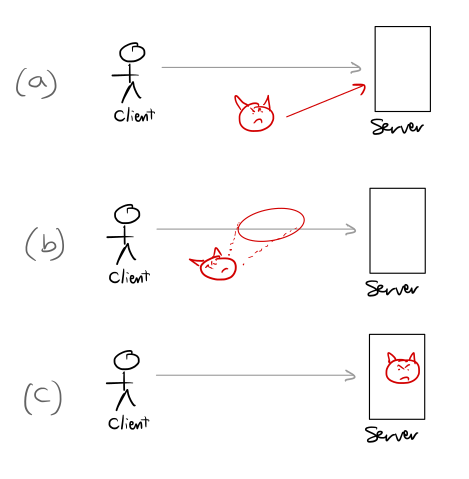
Figure 2.1 sketches three types of attacks on authentication systems. In more detail these are, in increasing order of strength are:
Direct attack. The attacker tries to impersonate the honest user, even though the attacker has never seen the target user authenticate. PIN-based and password-based authentication systems typically aim to defend only against direct attacks. For example, if your phone has a screen-lock PIN, it defends against an attacker that finds your phone on the street and tries to unlock it by guessing your PIN.
At the same time, PIN-based authentication systems do not protect against an attacker that can look over your shoulder while you are typing your password. These systems only aim to provide security when the attacker never sees you (the honest user) authenticate.
Eavesdropping attack. A stronger security goal for authentication systems is to defend against eavesdropping attacks. Here, the attacker observes an honest user authenticating many times and then tries to impersonate that user. For example, an attacker looks over the shoulder of an honest user authenticating many times, and then tries to impersonate the honest user. Or, an attacker sees all of the traffic between the client and server, and then tries to impersonate the client.
One-time passwords, such as the six-digit authentication codes that the Google Authenticator app uses, aim to protect against eavesdropping attacks: an attacker who sees one of your one-time passwords will not be able to use it to authenticate as you; it is a one-time password.
Active attack. The strongest security goal that we will consider is security against an active attack. Here, we envision an attacker that compromises the server, then interacts many times with the honest user, and finally—after the server is restored to a good state—tries to authenticate as the honest user (active attack).
Servers on the web are often designed to protect against active attacks: even if an attacker can break into one of Google’s front-end web servers interacts with authenticating clients, the attacker should not be able to authenticate as those clients to other Google services
U2F security keys, and other schemes based on digital signatures (Chapter 5), aim to protect against active attacks.
Systems that defend against active attacks provide the strongest form of security, in that they also protect against eavesdropping attacks and direct attacks. Systems that defend against eavesdropping also defend against direct attacks. Systems that defend against direct attacks are the weakest—they do not necessarily provide any protection against the other types of attack.
In the remainder of this chapter, we will consider three increasingly strong types of authentication, that provide these three increasingly strong security properties.
2.2 Protecting against direct attacks: Bearer tokens, PINs, and passwords

The simplest form of authentication uses secret passwords or PINs. We sometimes call these secret values bearer tokens; whoever bears (holds) a user’s token can authenticate as that user. Authentication with such schemes works as follows:
- The server holds a password (or PIN or random token string) for the client.
- To authenticate, the client sends their password to the server.
- The server checks the password against its stored password and accepts if they match.
The benefit of password-based authentication schemes is that they are simple and easy to implement. In addition, a human can play the role of the client in a password-based authentication system (e.g., as you do when you type a PIN into your phone). Fancier authentication systems require the client to run complex cryptographic algorithms, which are too difficult for most humans to compute in their brains.
Bearer-token-based schemes do provide security against direct attacks: if a direct attacker has never seen the client authenticate, the attacker’s best strategy is to just guess the client’s password. Thus, the security of these schemes against direct attacks depends entirely on the adversary’s uncertainty about the client’s password.
In some bearer-token-based systems, the server can assign a random password to each user. For example, when you create an account for certain web APIs, the API provider will give you a random secret key—a bearer token. You will have to include this secret key with each API request. Modern APIs use the stronger authentication mechanisms we describe later in this chapter.
What makes a good password?
In the vast majority of password- and PIN-based login systems, the user may choose their own password. This creates all sorts of headaches…
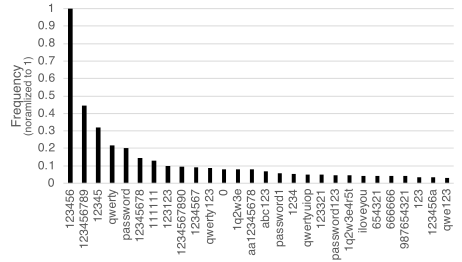
The security of a password-based authentication system rests entirely on the attacker’s inability to guess the client’s password in a small number of guesses.
Entropy is a way to quantify an adversary’s uncertainty about a value sampled using a random process, or from a particular probability distribution. If a distribution has \(b\) bits of entropy, then it will take at least roughly \(2^b\) guesses for an attacker to correctly guess a value sampled from this distribution.
There are many definitions of entropy, which are all slightly different from each other. We are being very informal here, so we will call them all entropy and not worry about the fine distinctions between the different notions.
The uniform distribution over 128-bit strings has 128 bits of entropy. The distribution from which humans typically choose their passwords has much less entropy—empirically, more like 20 bits.
Ideally, we would want all passwords to be equally as likely, from the adversary’s perspective. (These would be “high-entropy” passwords.) If a system generated a truly random \(b\)-bit password for each user, each password would be indeed equally likely and it would take the attacker roughly \(2^b\) time to guess the user’s password. But then it becomes very difficult for a user to remember their password.
Common passwords are easy to guess. Typically, people have to remember their passwords, so we let them pick their own passwords. When they do, it turns out that many people are likely to choose the same password.
A typical human might sample their password from a distribution with roughly 20 bits of entropy—if an adversary is able to make \(2^{20}\) guesses at the password, they can expect to guess the password correctly. One can computer easily make \(2^{20}\) authentication requests to another in a few minutes.
Dealing with weak passwords
Every system that uses password- or PIN-based authentication must contend with the fact that most passwords are not that difficult for an attacker to guess.
In this section, we describe some common ways to mitigate the fact that users pick weak passwords. Each of these mitigations is flawed, but each is better than nothing. Each makes the attacker’s job slightly more difficult; by stacking a few of these defenses on top of each other, we can substantially strengthen the end-to-end system.
Aggressively limit the number of guesses. When using passwords as an authentication mechanism, an authentication system must always somehow limit the number of password guesses.
For example, some phones allow 10 guesses at the screen-lock PIN before the device resets itself. Limiting the number of guesses effectively prevents a single account from being compromised—provided that the password is not too too weak. One downside is guess limits create the possibility for denial-of-service attacks: an attacker can potentially make 10 guesses at your password and lock you out of your phone or online-banking account.
In addition, in many physical computer systems have multiple authorized users, each with their own password. If the guess limit is enforced only on a per-user basis, then an attacker can often compromise some account on the machine if it is allowed 10 guesses at every user’s password. Preventing these types of attacks requires some additional measures: websites that use password authentication rate-limit guesses by IP, or use CAPTCHAs, etc.
Try to coerce users into picking stronger passwords. Modern websites will often provide the user with a “password-strength checker” that tries to give the user some sense of how strong or weak their password is. These strength meters are completely heuristic and can be wildly wrong: they might say that 6175551212 is a great password; if the attacker knows that 617-555-1212 is my phone number, it is probably not a great password. These strength meters sometimes check a user’s password against public lists of popular passwords. Ensuring that your password isn’t in the million most popular ones gives you at least some protection against untargeted attacks.
Two common strategies for encouraging users to choose strong passwords that don’t work terribly well are:
- Require longer passwords. If someone tries to use
abc123as a password but it’s not long enough, they might useabc123456—but this doesn’t really add much uncertainty. There are standard ways to lengthen passwords, and a clever attacker will try these first. - Prohibit using common English words in passwords. It’s not clear that this is a good idea. Five randomly chosen words from the dictionary will form a strong password, and prohibiting English words in passwords may make passwords much more difficult to remember.
Avoiding weak passwords with a password manager
When using passwords to authenticate to a website, a user can install a password manager on their computer that will generate random passwords for them. Since the user doesn’t need to remember these passwords, the password manager can sample these passwords truly at random from a high-entropy distribution. Once the user authenticates to their computer (using a password, typically), they can then access their randomly generated passwords and use them to log in to their websites.
Internally, the password-manager software maintains a table of servers and the corresponding passwords:
| server | user | pw |
|---|---|---|
amazon.com |
alice |
3xyt42... |
mit.edu |
alice4 |
a21$z... |
Even when using a password manager, password-based authentication schemes provide no security against eavesdropping or active attacks. If an attacker can observe you sending your password to the server (e.g., with a phishing attack) it can still authenticate as you.
Password hashing: Trying to get some protection against server compromise
Password-based authentication schemes provide no security against active attacks, in which the attacker compromises the server. And yet, since attackers manage to breach web servers quite often, we would really like to provide some defense against server compromise.
Forcing password changes. A system may force their users to change passwords on a regular schedule (e.g., every six months). If an attacker has compromised the password database on the server, it only has a limited amount of time to access the system before the passwords change and it will get locked out. It is not clear that the cost of requiring frequent password changes is worth the benefit.
Since common passwords are easy to guess, avoiding password-based authentication entirely is the safest option where possible. When a system must use passwords for authentication, the safest way to store them (e.g., on a server) is using a salted cryptographic password-hashing function. The goal is to make it as difficult as possible for an attacker to recover the plaintext passwords, given the hashed values stored on the server.
To describe how this works: when a user creates an account with password pw, the server chooses a random 128-bit string, called a salt, and the server stores the salt and the hash value \(h=H(\text{salt}\|\text{pw})\), where \(H\) is a special password-hashing function.
The server then stores a table that looks like this:
A rainbow table is a common data structure that an attacker can use to invert unsalted password hashes. A rainbow table is essentially a compressed table \((\mathtt{passwd}, H(\mathtt{passwd}))\) pairs, where \(H\) is a common hash function, and \(\mathtt{passwd}\) ranges over a large set of common passwords.
An attacker can download rainbow tables for common cryptographic hash functions, such as MD5 or SHA1, from the web. If the password hash is salted with a 128-bit salt, it will be infeasible to produce a table that covers any reasonably large fraction of the \((\mathtt{salt}\|\mathtt{passwd})\) pairs.
| user | salt | \(H(\text{salt}\|\text{pw})\) |
|---|---|---|
| alice | \(r_a\) | \(h_a\) |
| bob | \(r_b\) | \(h_b\) |
Later on, when the user sends a password \(\text{pw}'\) to the server to authenticate, the server can use the salt and hash function to compute a value \(h' = H(\text{salt}\|\text{pw}')\). If this hash value \(h'\) matches the server’s stored value \(h\) for this user, the server accepts the password.
To explain the rationale for this design:
- The password-hashing function \(H\) is designed to be relatively expensive to compute—possibly using a large amount of RAM and taking a second or more of computation. This makes it more difficult for an attacker to brute-force invert the hash value, since each guess at the password requires a second of computation (instead of the microseconds required to compute a standard hash function, such as SHA256).
- The use of a per-user random salt ensures that guesses at one user’s password are useless in inverting another user’s password hash. Salting also defeats precomputation attacks, in which an attacker precomputes the hashes of many common passwords to speed up this hash-inversion step later on.
Biometrics
Biometrics are physical features like your fingerprints, your face, etc. These are essentially a type of bearer token: whoever is able to produce a face that looks like yours is able to authenticate as you.
Biometrics are very convenient to use for authentication, since you will not forget them and cannot easily lose them. Biometrics most useful when authenticating in person to a device, such as for phone unlock, or to grant a person access to a secure vault. In these settings, the device performing the authentication has a “trusted input path” that can provide some assurance that a real human who owns that biometric is on the other end. Biometrics are not so useful for authenticating over a network because the network typically does not provide a trusted input path (i.e., does not provide any assurance that the biometric readings are coming from a real human), and the biometric data itself is not particularly secret. In particular, if we used biometrics for network authentication, an adversary who knows what your fingerprints looks like could log in to your account. (Since biometrics are essentially impossible to change, this is a major drawback.)
2.3 Protecting against eavesdropping attacks: Challenge-response protocols
We have so far been talking about a human manually authenticating to a device (ATM, phone, laptop, etc.) by physically entering a PIN or password into the device. But we often log in to some server on the network—Facebook, Gmail, MIT, and so on. In this scenario, we can get much more creative with the authentication mechanism we use and the security properties we can demand.
We now assume that our computer has some key \(k\) (e.g., a random 128-bit string), and the server also holds the same key \(k\). In this setting, we can hope to provide security against eavesdropping attacks: even if an attacker can observe the traffic between the client and server, the attacker learns no information that can help it authenticate as the client later on.
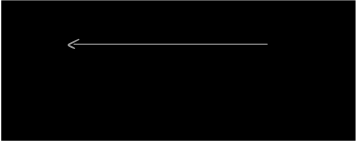
Figure 2.3 describes an über-simplified challenge-response authentication scheme that provides security against eavesdropping attacks. The protocol takes place between a client and server holding a shared secret key \(k\).
- The server chooses a long random string \(c\), which we call a challenge and sends it to the authenticating client.
- The client computes an authentication “tag” \(t \gets F(k, c)\), where \(F(\cdot, c)\) is hard to compute without knowing \(k\). (The function \(F\) here is a Message Authentication Code, which we will talk more specifically about in Chapter 4.) The sends the MAC tag \(t\) to the server.
- The server receives a tag \(t'\) from the client and ensures that \(t' = F(k,c)\). If so, the server considers the authentication successful.
The security of this scheme derives from the fact that an attacker cannot produce tags \(F(k,c)\) on new challenge values \(c\). (An attacker can always try to replay an old tag it has seen, but since the challenge changes with every authentication request, the server will always reject the old tag.)
Time-based One-Time Passwords (TOTP)
Time-based one-time passwords are a type of challenge-response authentication protocol. The only difference from Figure 2.3 is that in a TOTP scheme, the client and server derive the challenge from the current time. The user has a device, such as a phone, that shares a secret key \(k\) (e.g., a random 128-bit string) with the server. Both parties agree on a protocol by which to generate this code—something like \(F(k, \mathtt{gettimeofday()\ /\ 30})\). The phone can generate the code, display it to the user, and the server can then verify the code by recomputing it.
Authenticating requests
Often, a client will want to send an authenticated message to a server. That is, the client often wants to simultaneously authenticate to the server and send a request \(\mathsf{req}\), such as \(\mathsf{req} = \mathtt{rm\ file.txt}\). To accomplish this, the client can compute the challenge value as the hash of the server-provided challenge \(c\) and the client’s request. So the tag looks like: \(t_{\mathsf{req}} \gets F(k, c \| \mathsf{req})\). Then the client sends the pair \((t_{\mathsf{req}}, \mathsf{req})\) to the server. In this way, the server can simultaneously authenticate the client and be sure that the request \(\mathsf{req}\) came from the client.
An unsafe way for the client to simultaneously authenticate to the server and send a request would be for the client to compute the MAC tag \(t \gets \MAC(k,r)\) and then send \((t, \mathsf{req})\) to the server. A network attacker could modify the client’s request to \((t, \mathsf{req'})\) en route to the server without the server being able to detect this attack.
Phishing attacks (attacker-in-the-middle attacks)
A phishing attack is one in which an attacker tricks a user into giving away their Gmail password, for example, by creating a website that looks, for example, like the gmail.com login page. TOTP passwords have a similar vulnerability: an attacker can simply ask the user to give her the one-time code by pretending to be tech support, or the user’s employer, or a customer-service representative. In this setting, TOTP codes are slightly better than standard passwords since the attacker must use a stolen TOTP code within $$30 seconds of stealing it, which requires a much more sophisticated attack.
Phishing attacks take advantage of the fact that in password- and TOTP-based authentication schemes, there is no binding between the authentication process and the server’s subsequent communication with the client. The attacker here doesn’t really break the authentication scheme; the problem is that the authentication scheme didn’t authenticate enough. U2F, which we now discuss, handles that issue.
2.4 Protecting against active attacks: Signatures and U2F
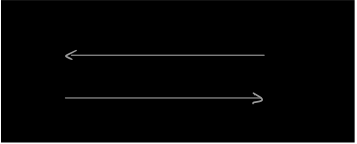
To provide security against active attacks, we can use an authentication scheme based on digital signatures, which we will discuss in Chapter 5. With these schemes, the client has a secret key \(k\) and the server stores some hard-to-invert function of the key \(F(k)\). (We call \(F(k)\) the “public key.”) In particular, the server does not store any secrets—even if the attacker can compromise the server and/or interact with the honest client, it cannot learn the client’s secret key \(k\) nor learn any information that it can use to later authenticate as the client. To authenticate, the server sends the client a challenge and the client produces a digital signature on the challenge \(c\)—essentially a proof that the client knows the secret key \(k\) and that it intended to sign the challenge \(c\).
The U2F USB security tokens that you may have seen use this form of authentication. As an added bonus, they prevent phishing attacks by binding the authentication process to the name of the server that the client is trying to authenticate to. In particular, the U2F software on the client passes the name of the server (e.g., amazon.com), in addition to a server-provided random challenge \(c\), to the U2F token. The token then produces a signature on the string \(c\|\mathtt{amazon.com}\). If the attacker sets up amason.com and gets the user to visit it, the U2F device will only generate a code that is good for amason.com and not the real amazon.com.
2.5 Two-Factor Authentication
Many systems use multiple forms of authentication to try to boost security. In particular, as we have already seen, passwords are a weak authentication mechanism: humans are bad at choosing strong passwords and attackers have become good at stealing password databases and recovering many users’ passwords at once.
A common technique to harden password-based authentication systems is to combine passwords with a second method of authentication—one with a different failure mode. Common authentication schemes are:
- Something you know: password, PIN, etc
- Something you have: USB key, phone, etc
- Something you are: biometrics (fingerprint, face ID)…